
TIPS

Adding custom formatting to all list views

Adding custom formatting to all list views

One of the most exciting changes to SharePoint in the last few years is the advances in custom formatting of columns, views, and forms. These capabilities have transformed lists from functional tools that are pretty boring to exciting, dynamic, visual presentations of data with colors, icons, and almost anything you can design in HTML/CSS. By default, most of the custom formatting samples for columns are shown in a single view, but it is just few steps to make this formatting active in every view.

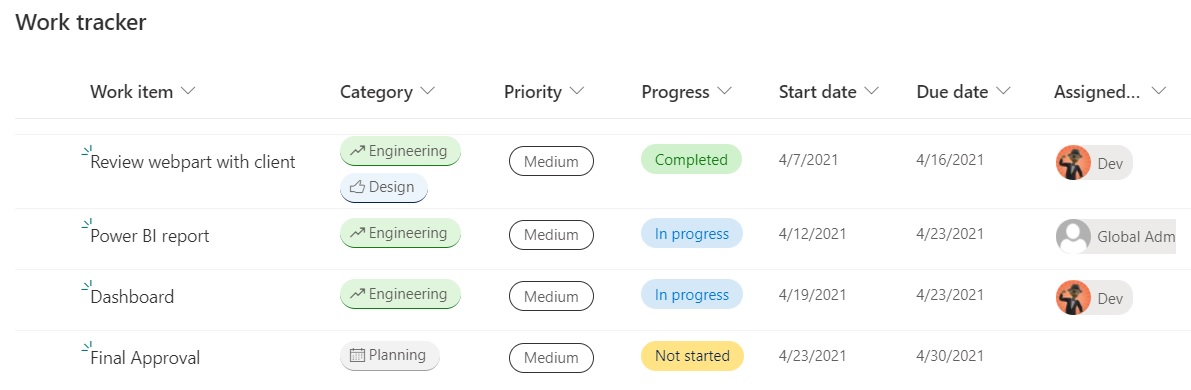
First, let’s find out how to create some custom formatting. I started with a Work Tracker list from the templates provided in Microsoft Lists and added some data about a project. As you can see from the image below, this template already has custom formatting in several columns. (Category, Priority, Progress, and Assigned to).

Certified! Microsoft 365 Developer Associate

Certified! Microsoft 365 Developer Associate

I’m always excited when I earn a certification, but some are more special than others. I have been working for over a year to learn all the skills needed to earn the Microsoft 365 Developer Associate certification. While I have been working as a SharePoint developer for almost 15 years, most of my work has been in very specific areas, like webparts or apps. Certifications normally require more skills than one person would have experience in, even someone doing this as long as I have. MS-600, which is the only exam needed for the certification, covers several areas that I just don’t operate in every day. It has taken a while for me to get comfortable in those areas.

Disconnecting to stay sane

Disconnecting to stay sane

I recently took my first vacation since the Covid-19 pandemic began. We travelled to Puerto Vallarta, Mexico, and to be completely candid, I was nervous. For the last 10 years, I have travelled often for work and pleasure, but this is the first time in over a year that we have been on an airplane. While I think my health is pretty good, I fall into the high-risk category for Covid-19 based on the official guidelines. The thought of going through an airport, getting on an airplane, and staying in a hotel for 9 days was daunting.

Instant emojis in Windows 10

Instant emojis in Windows 10

So this post falls into the category of “How old where you when you found out…?” The question is answered “I was today years old” because that’s how the question usually works. This was one of those days.

I was listening to a recording of the bi-weekly “Microsoft 365 Developer SIG community call,” which happens on the 4th Thursday of every month. (The Microsoft 365 Platform community calls are all worth checking out and each of them is recorded and then uploaded to Youtube within 24 hours of the live event. Find out more info here: aka.ms/m365pnp) Part of the call was a demo by MVP Chris Kent on custom formatting in lists and he was showing how to use emojis in the formatting. Again, his demos are “must see TV,” both for content and entertainment value.

Resetting Azure MFA Registration

Resetting Azure MFA Registration

Users occasionally lose access to their Multifactor Authentication (MFA) source, possibly by purchasing a new phone or changing phone numbers. When this happens, they are locked out of any resource that requires MFA. In these cases, they need to re-register for MFA with their new source.

Here are the steps to reset MFA registration for a user in Azure:

NOTE: to reset a user’s MFA registration, the account performing the following actions must be in the Authentication Admin or Global Admin role.

New Debug Options for SPFx (Edge)

New Debug Options for SPFx (Edge)

As the development pendulum has swung back to the “front end,” I find a majority of my time in VS Code. Back in the early days of VS Code, I missed the rich toolset of Visual Studio, but as I became more comfortable with the combination of command line and graphical interfaces in VS Code, as well as the explosion of awesome extensions for VS Code, I found myself opening Visual Studio less and less. (Honestly, when I open Visual Studio these days, it’s because the icon is next to VS Code in my taskbar and I accidentally click the wrong one. As long as it’s open, I apply the latest updates and close it back down.)