
Posts

SharePoint Devs be aware! DOM changes are happening!

SharePoint Devs be aware! DOM changes are happening!

Microsoft warned us! The Document Object Model (DOM) on web pages was a common target in my pre-SPFx solutions, especially the ones that used jQuery. When SPFx came along, Microsoft was very clear that the classes and element ids on the modern page were not an API. By that, they meant that there was no contract with developers that those values would not change in the future. The future is here!

Acknowledging Microsoft’s warning, I vowed to stay in the box and not rely on any classes that were not included as part of my solution. Other than “fixing” the workbench to behave like an actual page in SharePoint, I went a long time before breaking my vow. I have a client that complained non-stop about the white-space between web parts on their intranet homepage. I calmly explained multiple times why Microsoft chose to design the modern page with this white-space, but they insisted that I needed to change it. Eventually, the “client is right” mantra won, so I built a web part that would allow the client to adjust the horizontal and vertical spacing between web parts. Again, I warned them that one day the page might just disappear. Happy client == happy paycheck!

As soon as I got the call about the white-space being back, I had a pretty good idea what happened. Sure enough, when I cracked open the Dev Tools of my favorite browser (Edge), it didn’t take long to find the issue. The two classes I used to adjust spacing were no longer there. There were new classes in their place that seem pretty cryptic, having what appears to be an identifier (partial GUID) as part of the class name. Those class names did not look like a stable place to be targeting at all. To Microsoft’s credit, they (mostly) took the old class names and moved them into an attribute called data-automation-id. Not only did this help track down what had changed, but gave me new targets to “fix” my broken web part for now.
SPFx 'gulp clean' - don't neglect its use during deployments

SPFx 'gulp clean' - don't neglect its use during deployments

I recently ran into a situation where building and debugging a SPFx web part seemed to go off the rails. Then I figured out that my normal pattern of skipping the ‘gulp clean’ command during project deployment had cause what I thought was bizarre behavior in Site Collection Features and toolbox.

I was working for a client that does not have a dedicated development or QA environment due primarily to political reasons. They also block access to all non-company tenants. Fortunately, I am able to do my development “off network” and once everything is ready, I move the code inside the firewall. Since this was an update to an existing web part, I knew deploying it to the same tenant as the existing web part was going to be tricky. The existing web part is on the company intranet home page, so getting into a site for testing without affecting the original web part meant deploying into a “QA” site app catalog. I thought this would work and there shouldn’t be any conflict. Famous last words …

Wrap-up: North American Collaboration Summit

Wrap-up: North American Collaboration Summit

There were definitely doubters, but the North American Collaboration Summit has successfully executed the first “hybrid model” conference. And the results were better than any of us imagined.

  • To read a full summary, including lessons learned, from conference organizer Mark Rackley, click here

The decision to go

Honestly, my beautiful wife, Tracy, and I were excited to just get out of the house and go somewhere. We have tried hard to abide by the recommended protocols of social distancing and protective measures. For months, we have limited contact to just our family and a very small number of selected friends. I was nervous about attending such a public event, but after talking to Mark about the measures that were going to be taken by the hotel where the conference was being held, the “contract” that all attendee and speakers would abide by and the current COVID-19 situation in the Branson, MO, area, we decided the risk was within reason to attend the event in person.

UPDATE #3: North American Collaboration Summit

UPDATE #3: North American Collaboration Summit

UPDATE-MARCH 30

Due to the global pandemic, NACS has been rescheduled for Sep 28-30, 2020. Click the image above for the latest information

UPDATE-AUGUST 14

NACS is officially a go for Sep 28-30, 2020. The event sill be the first hybrid conference! Click the image above for the latest information, including what session(s) I will be presenting!

UPDATE-AUGUST 24

The schedule has been published, so I have updated my sessions below. Click the image above for the latest information on all of the sessions!

Flicon: Find your Fluent UI icons in one simple place

Flicon: Find your Fluent UI icons in one simple place

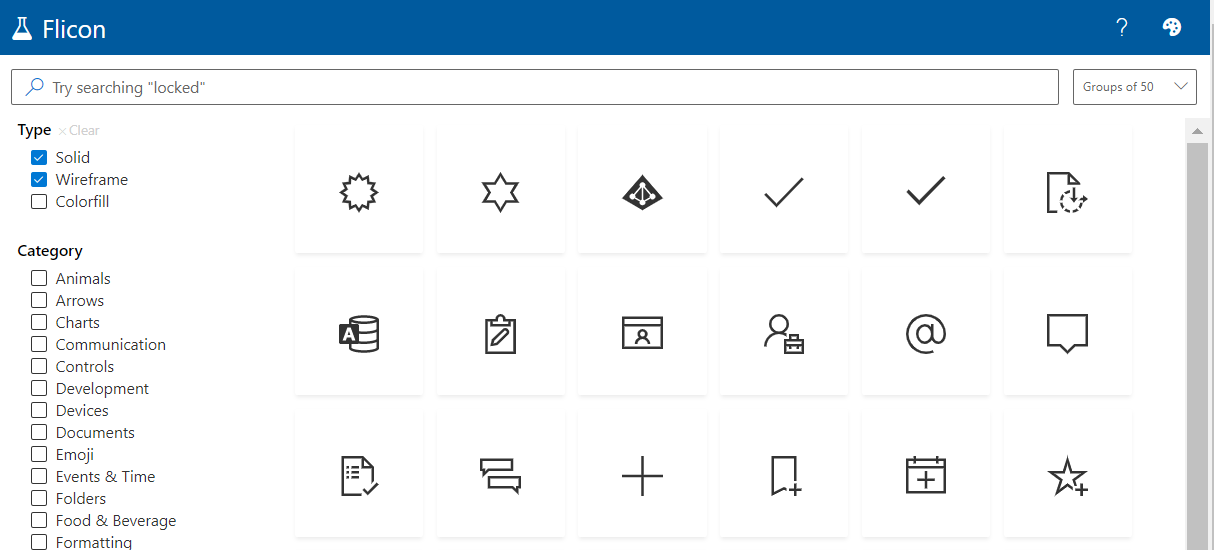
Have you ever found yourself looking for an icon, but not able to quite track down the perfect one? Between SPFx projects and the new modern list formatting capabilities in Microsoft 365, I am often looking for the icon to perfectly represent my idea. Until now, this process involved browsing through the Fluent UI website in hopes that I will stumble across one that works. Now there is a better way: Flicon.io

This new site is the brainchild of Chris Kent, Microsoft Office Development MVP and speaker extraordinaire. As a member of the Microsoft 365 PnP Core team, Chris spends a lot of time working on samples of List formatting, often using icons in those samples. I’m betting that he got tired of trying to find appropriate icons for his entertaining demos on the weekly “Sharing Is Caring” calls and decided to build a better solution. The problem with the current process is that you can only search for icons by name and often the name does not fit into the category of icon you are looking for.

Flicon.io is a tool that lets you search for icons based on categories and tags that have been associated with each icon instead of just the name. Let’s take a look at how that works.

UPDATE #2: North American Collaboration Summit

UPDATE #2: North American Collaboration Summit

UPDATE-MARCH 30

Due to the global pandemic, NACS has been rescheduled for Sep 28-30, 2020. Click the image above for the latest information

UPDATE-AUGUST 14

NACS is officially a go for Sep 28-30, 2020. The event sill be the first hybrid conference! Click the image above for the latest information, including what session(s) I will be presenting! Click the image above for the latest information

If you haven’t heard, there is an awesome conference being held in Branson, MO, April 2-3, 2020. In addition to having many of the same speakers at the large Microsoft conferences, this is one of the most affordable conferences in the country, almost 10 times less than the major conferences. There are 70+ sessions over the two day conference and 7 additional full-day workshops. I hope to see you there!